For crane and truck crews, on the ground and in the cab
Signals from the ground to the cab.
STOP, HOLD, SLOW and every move for cranes, trucks and dump trucks, sent over a live connection between the phones on the jobsite.
Free todayNo accountNothing to install23 languages
How it works
Three steps to a live jobsite.
Start a jobsite
One tap makes your crew's jobsite, with its own link and code.
Bring the crew in
Send the link, read the code out over the radio, or let them scan the QR code. Nobody installs anything or signs up.
Pick your job on the lift
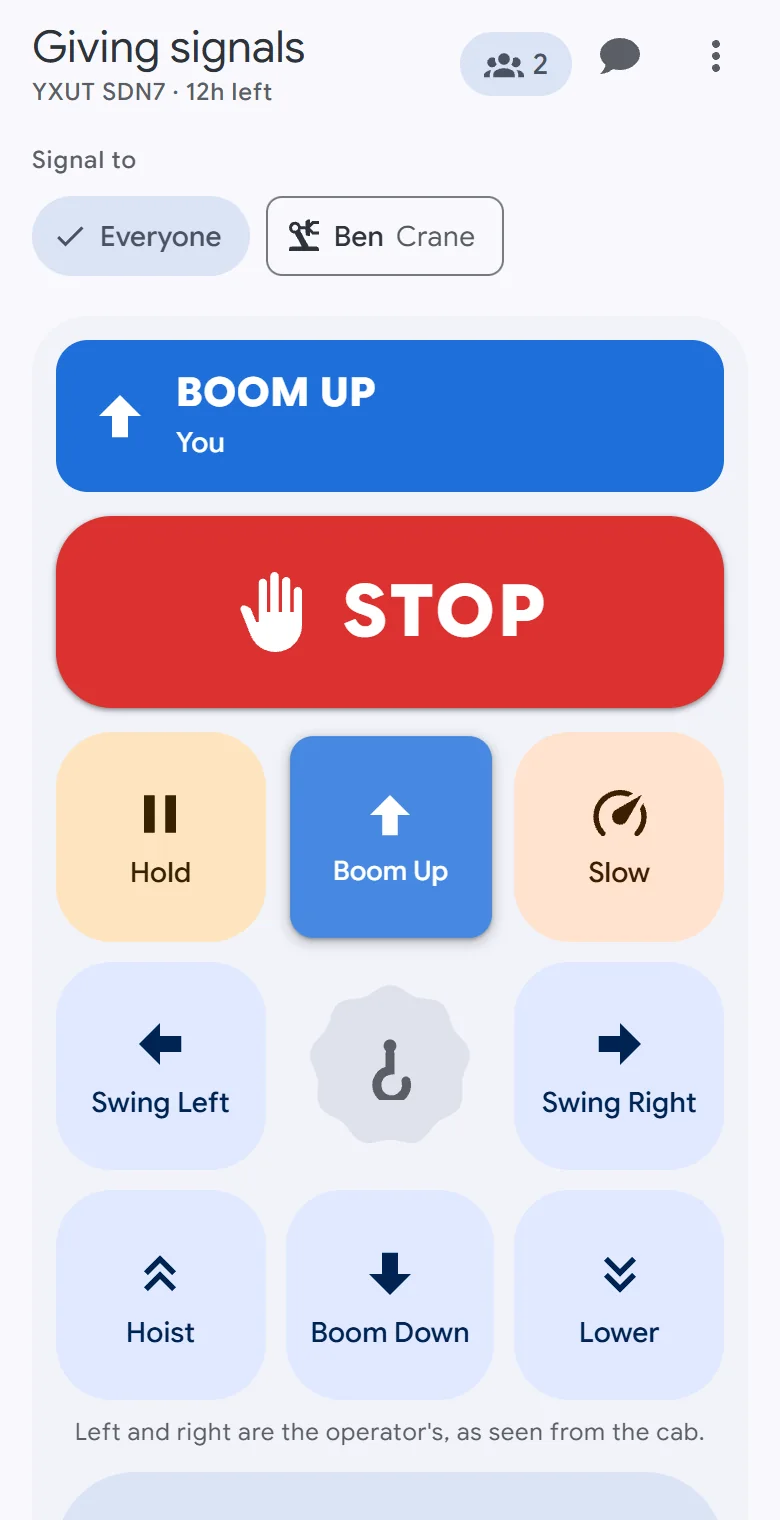
Giving signals gets the pad. In the cab gets the move being called, full screen.
In the cab
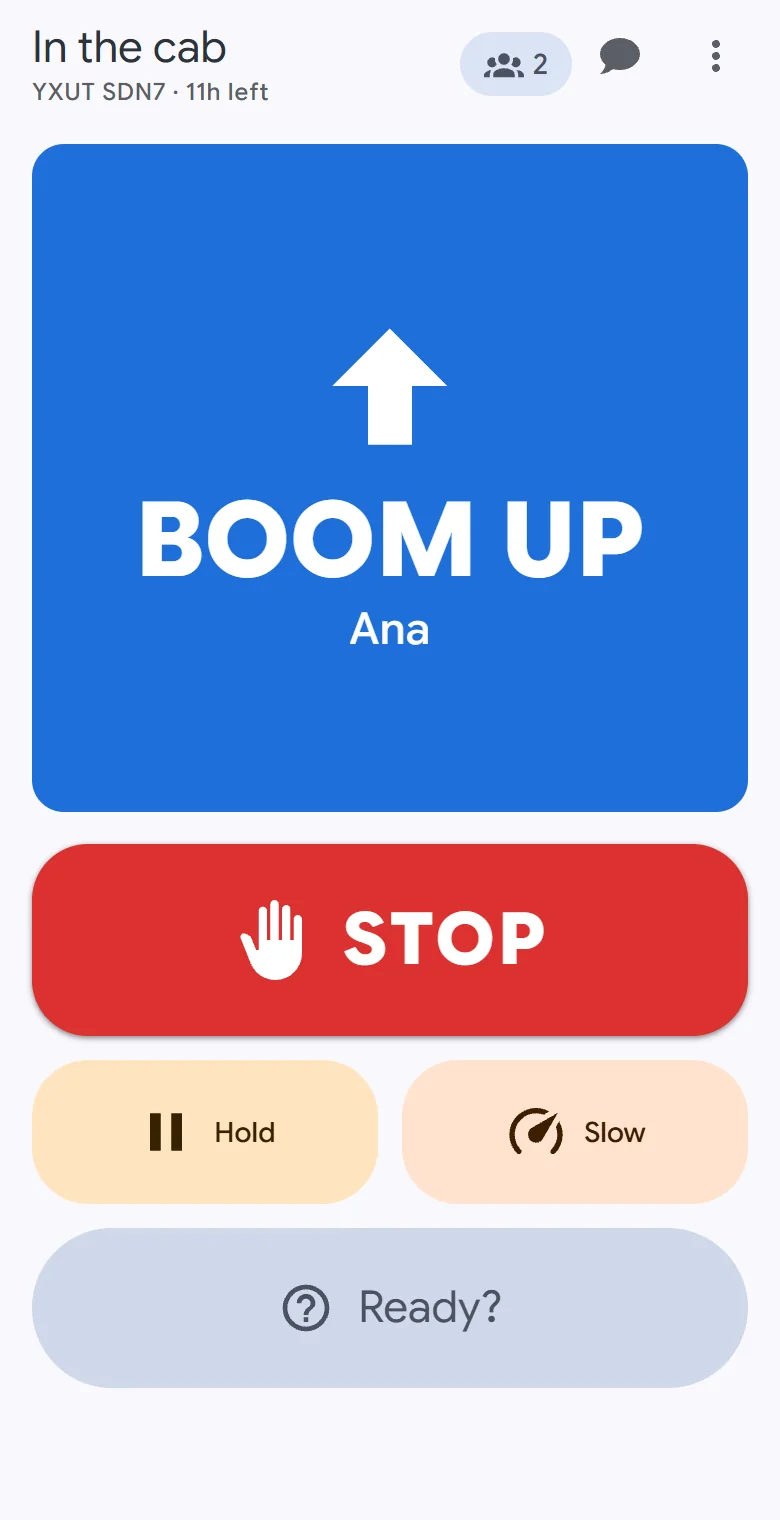
The move being called, at a glance.
- The move fills the screen with who is calling it, and a tone plays for as long as it is called.
- While SLOW is on, every move's tone is deeper and swells.
- STOP, HOLD, SLOW and the answer to Ready? stay one tap away.
- There are no move buttons to knock by accident.
- On its side, the phone shows the signal on the left and the controls on the right.
Signals
What a lift needs, and nothing else.
The crew, the chat and the settings wait behind a button. While one of them is open, the live signal and STOP stay in sight above it.
STOP from anyone
One tap on any phone sends STOP. Every other phone shows it full screen, with a tone and a long buzz, and every move being called is released.
HOLD and SLOW for everyone
They belong to the jobsite, not to one phone: everyone sees and hears the same, and someone who joins mid-lift gets them at once. While HOLD is on, no move can start.
Press and hold to move
A move is called only while a finger is on it. Let go, lock the phone or lose the connection, and it is released.
Ready?
Ask the crew. Everyone else gets Yes and No, and the answer shows on every phone with who gave it.
Cranes, trucks and dump trucks
Each machine has its own buttons: boom, swing and hoist for a crane; drive, back up and steer for a truck; the bed for a dump truck.
Signal one operator
Send moves to everyone, or to one person in a cab, and your pad shows their machine's buttons. STOP, HOLD, SLOW and Ready? always reach everyone.
The crew
Talk, share, and read it anywhere.
Quick calls and chat
Go Ahead, Copy That, All Clear, Say Again? and more in one tap, and a chat the jobsite keeps for whoever joins. A quick call that could not go out in time is dropped, so a late Go Ahead never arrives.
Hands-free voice
A voice call for the whole crew, with a mute for yourself or for anyone else.
A link, a code or a QR code
Text the link, read the code out, or let the crew scan the QR code on your screen.
No app, no account
Any phone with a current browser joins from the link. A name is all anyone types.
23 languages
Each phone in its own language, with one checked word for every signal. The signal pad never mirrors, even in Arabic.
Sunlight contrast
Light, dark and black themes, and a Sunlight setting that raises the contrast of every colour and signal for reading outdoors.
The jobsite link
One link for one shift.
- A link lives 12 hours from the first time someone joins. It is never extended, and then it says it has expired.
- A jobsite nobody is on is cleared after 3 hours.
- Codes are random and never listed anywhere, so share them only with your crew.
- A phone remembers the jobsites it is still on, and a reload puts it straight back on the jobsite.
Questions
The details.
Does OperatorLink replace a signal person, hand signals or a radio?
No. OperatorLink is a communication aid. It works alongside your site's own signalling rules and a qualified signal person, never in their place. Keep the hand signals and radios your site requires.
Is it certified to a safety standard?
No. OperatorLink is not certified, and using it does not make a lift meet any standard or regulation. Your site's rules decide who signals and how.
What happens when a phone loses its connection?
Every phone shows plainly when it has lost its connection: its signals and messages are not going out until it is back, and the strip above any open sheet says so too.
A move whose caller drops off is released on every phone. Back online, the phone rejoins as the same person. A STOP pressed while it was reconnecting goes out if the connection returns within 30 seconds; a move is never sent late.
Who can join a jobsite?
Anyone with its link or code, so share them only with your crew. A jobsite has room for up to 24 people, and the crew list shows who is on it right now.
What does it cost?
It is free today, and nobody needs an account.
Which phones does it work on?
Any phone with a current browser. The page keeps the screen awake while you are on a jobsite, where the browser allows it. Vibration works in Android browsers but not on an iPhone, where the tones and the screen carry each signal.
Which languages does it speak, and who translated them?
23 languages, from Spanish and Polish to Arabic, Hindi and Thai. Each phone follows its own language, or picks one.
The translations are made and checked by machine. Each language has one word for every signal, read back blind by a second model, and a signal word that fails those checks stays in English. No person has reviewed them.
Can we keep a record of a lift?
Each phone can save a plain-text log of the signals and chat it saw while it was on the jobsite, with how long each move was called. OperatorLink keeps no record of a shift's signals.
Start a jobsite and send the link.
Free today. No account, nothing to install.